Friday, September 7, 2012

Which iPad Case Is Best for You?

Choosing the best iPad case for your shiny new iPad is not easy. While not everyone wants to cover up their iPad, we maintain that everyone should have at least one available for certain occasions. A well designed iPad case can enhance both the functionality and style of your iPad.
Now that the iPad has been out for several years, with its 3rd generation having been launched earlier this year, consumers are faced with a staggering number of choices in the way of iPad cases. In this article we will look at some of the more common options and ways to help you decide which type of case is best for you.
Online outlets and retailers offer a near limitless selection of iPad cases. The majority of these look remarkably similar and were more than likely put together in the same factory. They are typically on the lower end of the price scale costing as high as $20 and sometimes lower than $10! If you are looking for an iPad case that purely provides some additional level of protection to your iPad, these cases are for you. However, if you are willing to spend a little bit extra over the cost of other tablets to buy an iPad, chances are you want something a little bit nicer that doesn't hide up your nice shiny device.
If that's you, then cases then a notebook or folio case might be for you. These cases are leather bound, folio style iPad cases designed to make your iPad look like it is resting in a leather moleskin notebook. Some of these cases have been around since the release of the first generation ipad and have been extremely populat among iPad buyers. All of these cases share a similar design. Leather on the outside with a bookcloth inside. The iPad itself is nestled in a wooden frame made of either Queensland maple, birch or bamboo. While some of these case have won various competitions and design awards, there have been numerous complaints about the strength of the case and the grip that holds the iPad in. All cases use a somewhat similar style of grip to hold the iPad in its wooden case, with varying degrees of success. All of these cases can also be utilised as a stand for the iPad case.
The third type of case you might consider is one with additional functionality such as a keyboard or dedicated stand. These cases can cost upwards of $100, but are a must for many iPad owners. If you are always on the go or find yourself using your iPad for a large majority of your work, taking notes or watching media, you might consider one of these cases.
I hope that this has provided you with a brief overview of some of the options available to you in the iPad case arena. Happy shopping!

Wednesday, August 22, 2012

7 Things To Check Out Before Selecting An iPad Downloads Site

You have the iPad, I have the iPad and everyone on the street has one. We bought the iPads to be one amongst all, but what should be do know? Every other person in your city, my city has one? I have found a solution to this problem. We must keep our iPads up to date with latest content such as music, movies and other iPad downloads. That said, is an task in itself to choose the right iPad downloads site because there are tons of iPad download sites out there, some genuine iPad downloads site and some fake. So, should we choose a genuine and quality iPad download site:
Service fees: This was one of my main concerns while choosing a site for iPad downloads. It is not a concern anymore as I have found a site which gives unlimited downloads for nominal fees. I have shared its review with you on my blog. There are essentially two service fees options available. One is pay a small amount of charge for each download and the other payment for iPad downloads is to pay a certain charge monthly. I personally think the second payment cycle is better? Why? Because if you are going to pay on per download basis then you will pay less at that instant but you will end up paying more in the long run. Hence I would recommend you to go for an iPad download site which has a monthly billing cycle.
Collection of files: By this I mean the variety of iPad downloads the site has for you. We are paying enough to get a wide variety of iPad downloads. So go for a site which you know has a wide variety iPad downloads (you can visit the ipad downloads site by click the below links).The best iPad downloads site is the one which fulfils all your iPad content needs at one go. The site has every iPad download from movies, music to videos to TV shows and everything on the earth you can imagine.
Quality downloads at fast speed: There is no use if the site has tons of content for your iPad but the downloading speed is like the walk of a turtle. To take full advantage of the database of content the iPad downloads site is providing it must have a fast download speed. The site should be such that seconds after signing up you are able to download the content you want.
Customer support: What will happen if you have downloaded the most happening iPad content for your phone but due to some error you are not able to use it? At these times you will need the customer care of the site from where you are downloading your iPad content. That means the site you are choosing for downloads should have 24 hours support to back you up in case you face any roadblocks.
Essential Softwares: It is the job of the iPad downloads site to provide you with the essential converter softwares to make each of your software compatible with your iPad. Also the iPad downloads site should provide with a suitable transfer software to transfer your content from and into your iPad.
Legality: This where most of the sites remain behind. They do not have the proper copy rights and this leads to eventually the downfall of the site and waste of your money. But this is not the problem with the site I am using. So check it out.
Healthy downloads: The content which you download for your iPad should be free from all sypwares, Trojans and other viruses. Then only it you can make you of the downloads you need.

Article Source :

Saturday, August 18, 2012

iPad 2 Review - The Product of the Century?

Apple has sold more than 5 million iPads last year and the product the tablet was selected by Time Magazine as one of the best invention of 2010. Now, everyone around the globe is drooling over the next generation iPad.This is an iPad 2 review of what consumers and tech-geeks are expecting from the new tablet. Below are the main reasons why iPad 2 is expected to become the ultimate computer device for your web experience.
Safari: Safari is arguably the best web browser and the large multi-touch screen really puts the web in your hands. You can view the whole web site in portrait or landscape view. The best think about the iPad 2 is that you are browsing the web using the best pointing device known to man, your fingers. If you haven't tried it, go now to your local electronics store and scroll the tablet. You will be amazed of how fun and easy this is. Moreover, Safari is believed to be a much faster browser than Internet Explorer or FireFox and it's similar with Google's Chrome. It supports the latest web technology in HTML5. Also, you can sync your bookmarks from your Mac or Pc and your favorite search engine, Google, is build in.
You can also create app icons of your every day websites. Again, the iPad 2 makes printing easy with AirPrint and you can print with a few taps without cables. Mail: The new iPad 2 will make you change the way you think of your inbox. If you hold the iPad 2 in landscape it will showcase both the inbox and the message and when you turn it into portrait it fills the screen with that message. Moreover, the large keyboard that pops up will inspire you to write more. It's unbelievably easy to delete an email or to compose a new one. The best think about this app is that it combines all of your email accounts under one inbox. Photos: With the built-in Photos app on iPad 2, you can see and touch your photos in ways you could never imagine. You will not believe how tidy your picture folders look on the new iPad 2. The quality of the screen is unparalleled and your photos will look more crystal clear than ever before. Rumors suggest that the iPad 2 will have a build in SD card reader and a USB port so that you can easily import your photos.
The first iPad was a huge success for Apple and probably the new iPad 2 will be a greater success. Whether or not you are going to run to a store or pre-order it online I hope this iPad 2 review helped you.

Instructions for Using iPad

iPad is an excellent option for a person who wishes to experience the magic of multimedia. But with no instructions for using iPad can make it tricky. Many people start using an iPad for photos and videos. The first step is to synchronize the photo and video files which can be done from your computer or your digital camera. The interesting part of synchronizing images and videos with iPad is that, it automatically optimize the size of the files. This ensures more speed in displaying the content and more space to keep your files. To transfer an image, you can directly synchronize it with a digital camera or a computer or can be emailed into your iPad. Images send as email attachments can be saved by opening the attachment and choosing to save the image.
Another interesting option is to add images to the contact list. On the display, tap on the arrow near to the upper right end of the image and select assign to contact. This is really an easy and convenient option and will show the selected images when you want to view the contact or when someone calls you. You actually cannot create a photo album directly from your iPad. If you want to do this, you can transfer the images to your computer and then create a photo album. This album can then be transferred back to your iPad. Once you have created an album you can view the images in it as a slide show by tapping over the album icon. If you have an iPad VGA adaptor, you can project your videos or images over a LCD or overhead projector. However, not all iPads have support for VGA adaptor. If your iPad supports it, you can start project your multimedia files by using dissolve transition.
Photogen is one of the most popular applications for iPads. It helps you to create and edit your images easily. It is equipped with different temperatures, red eye reduction and color adjustments. Filterstorm is another application that lets you edit your images in HD quality. It has many professionally designed tools with ease of use menu. Some iPads has the feature of Airprint. By using this feature, you can print your documents and images wirelessly. In order to use this feature, you need to have a wireless printer also. You can access the Airprint options from the menu. If you have an Apple TV or airport express you can make use of Airplay feature in the iPad. With this excellent feature, you can stream your videos or files wirelessly into your TV or Music system. It is important that you update and backup your iPad to avail new features and to keep your files safe. To update your iPad, connect it with your computer with internet connection. Run the iOS devise in your computer and select 'check for updates' from the summary tab. You also have the options for backing up your contents and restoring the files in iOS devise.

The iPad Killer - A Review of the Major iPad Competitors

So you are drinking your coffee, reading your emails, typing up a document and designing a presentation. Then you realize that you have an appointment and can't be tied to your computer. With three projects do the next day, what are you going to do? Well switch to mobile computing, of course. You heard about that iPad Tablet. You also heard about other devices deemed the "iPad killers". Which one are you going to buy? This article will compare the iPad to its main competitors
The iPad. If you are reading this, chances are you already know what the specs of the iPad are. The iPad has a 9.7 inch multi-touch LCD screen; it has enough processing power to play HDTV video and is intuitive enough to allow you to make documents or presentations using iWork. There are two major criticisms however: multitasking and a closed OS. A closed OS means that you cannot install whatever you want on your iPad. The software must first be approved by Apple. While this is beneficial for security reasons, it might limit some users. The second criticisms - lack of multitasking can be both a cure and a poison. With no multitasking, you can only run one app at a time - this means that you would have no distractions. However if you are typing a report, and then need to verify some facts using Safari, you'll have to first close iWork, start safari, close safari and then re-open iWork. A tiresome process. Although this has not been officially announced, it is rumored that iPhoneOS 4.0 will have multitasking support.
HP Slate. The HP Slate will have a release price of slightly less than the iPad. It will have an atom CPU, include Flash support, USB connectivity, a memory card reader, and a back-mounted webcam. The major complaint against the HP Slate is that it is running Windows 7 on a touch screen device. All other tablets are running software that is optimized for the touch, yet HP is running Windows 7. Expect unresponsive controls, laggy interface and buggy programs. If you are looking for raw power, then the HP Slate is to go, however you'd get more bang for the buck from a netbook. And since HP Slate isn't optimized for touch, you'd be smarter to go for a netbook
The Notion Ink Adam. India's entry into the Tablet market. A significantly cheaper alternative to both the HP Slate and the iPad. The Adam features a bigger screen then the iPad, It uses a Pixel-Qi sceen (color e-ink), will be powered by a Tegra2 chip (1080p output), will have a swivel camera, will have a track pad and is powered by Android. If you can't afford the iPad, this device will give you the most bang for the buck. The touchscreen and trackpad is an intuitive combination. Apparently the explanation for the trackpad is to make surfing the web easier. One would think of the quality of the browser, if it requires a trackpad to achieve a positive experience. When I view the Notion Ink Adam, I can't help but get the feeling that it's software is of "cheap" quality. If you want good functionality at some GUI expense, go for the Adam. However, if you want quality software and hardware - I would recommend the iPad
The Microsoft Courier. I believe that the battle for the best Tablet device, will be fought, symbolically, between Microsoft and Apple. Right now, The Microsoft Courier is only a prototype, but a video has been leaked demonstrating its features. The courier is a dual screen concept. It measures only 5x7 when closed. Not much detail is known, only that the Courier is built on Tegra 2 and runs on Windows CE 6. Microsoft's emphasis is on mobility. I cannot recommend this device, at this point in time, as not much detail is known. But keep an eye on this one folks, it will be a major competitor to the iPad
Should you go with Apple's quality, yet slightly underpowered revolutionary device? HP's powerhouse, running the wrong OS? Notion Ink's cheaper alternative to mobile computing? Or Microsoft's mysterious Courier? Time will tell. Or more properly speaking, the consumers will.
The iPad's future is still uncertain. Visit my latest website for the latest (and daily updated) news, rumors and other interesting tidbits on Apple's iPad and its main competitors

Apple iPad Review - Everything You Need to Know About the Apple iPad

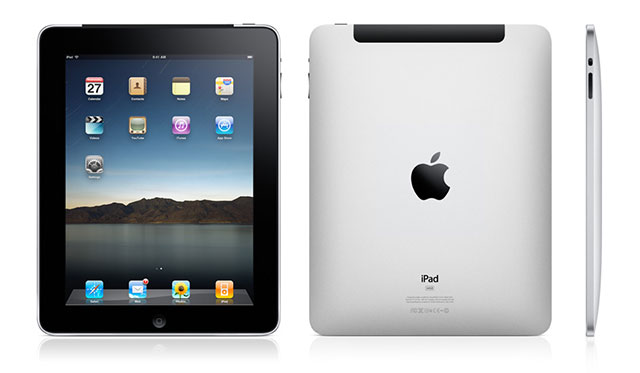
In this article I will review the latest Apple device. That is right! The iPad, so if you are thinking to buy this table computer than I really recommend you to read this review first, to avoid disappointment. There are loads of benefits of having an iPad however there are a few downfalls as well! That is why I strongly recommend reading carefully this comprehensive review before attempting to complete the purchase. You have been warned!
As I said before there are loads of benefits of having an iPad, therefore let's start with Pros of Apple iPad:
The Design: Apple made a really great job on the looks and feels of this new device; it really looks very cool and sexy. My first impression was "wow looks like a sci-fi Hollywood movie computer!" And it really feels that way, especially with the touch screen mechanism.
The Speed: I will be very honest, first I thought 1GB of processor power is not enough, and however after I tested myself I was really amused! iPad is really fast! I was able to perform multitasking without any sort of lagging or crashing. I really enjoyed browsing while listening to music at the same time.
The iWorks: this is one of the many pre built programs that comes with the iPad. It is like the Microsoft Office where you can write word documents, create spreadsheet, slideshows presentation and even databases. Very handy, especially while you are on a train.
Pure entertainment: if you liked the Apple iPhone and the Apple iPod then you will definitely love the Apple iPad! You got everything you need! Music, videos, pictures, ebooks and even the web! With a large screen and touch screen technology, iPad will never let you get bored.
So there you go! The benefits of having this astonishing device. However there are some drawbacks! (as I mentioned earlier):
The battery life: Apple official says that the battery will last for at least 10hours, however from my experienced (while to doing multitasking) really impacts of the lifespan of the battery.
No Flash support: this is one of the biggest drawbacks of the iPad! No Flash support, this makes impossible to view YouTube videos. However something tells me that with a huge customer demand Apple or even Google should create some kind of Flash plugin that will make YouTube very enjoyable to view in this tablet computer.
No USB slot: that is right the Apple iPad has not USB slots available, however this is not that bad has it sounds you see the iPad has got plenty of hard drive space that ranges from 16Bg to a massive 64GB.
So there you go Pros and Cons of having Apple iPad, I really hope you found this review very helpful! And now that you know what you are going to get with Apple iPad you are ready to complete the purchase.

iPad 3 Review: Is It Better Than the iPad 2?

It's not revolution, it's not evolution, it's resolution - according to Apple anyway. That's right, it's time again for the world to stop as Apple unveil the latest version of the iPad, the iPad 3 (or the new iPad as it is also affectionately known as). So what cool extras, new buttons or features does it have and are there any new features that we should be shouting about from the roof tops? Well not exactly. Apple are proud to announce that the new iPad is mainly about the high quality screen.
To be fair, they've gone to exceptional lengths to improve the quality, and that is the main difference between this version and the iPad2. It's also why they went with the tagline, 'it's resolutionary'. But other than this, how is different to the iPad2?
Retina Display
This is the main difference, and where Apple have really gone to town. The 9.7-inch screen is more packed than ever with pixels, all 1536 x 2048 of them. This gives off one of the most impressive display effects that you'll see on a tablet to date. The retina display has a PPI density of around 264, which means that technically it isn't as sharp as the iPhone 4 with its 330PPI, however Apple insist that with the iPad this should be held 15 inches in front of your face, as opposed to the 10 inches with the iPhone. This means, the sharpness will still look the same, ostensibly anyway.
Having said all of that, the Retina display is something to behold as the colour reproduction is so rich, it's pretty close to reality. This is where you'll see the real difference between the new iPad and its predecessors, put one next to the other and see the Apple interface and you'll notice that even the text within the apps are just that bit sharper. Great for watching videos, films, playing games, and of course browsing the web.
Design
It's not really anything different from the original 'pads', in fact it looks identical to the iPad 2 and you'd even struggle to tell them apart (when switched off of course). Despite it being the newest and latest in Apple's tablet range, it is in fact marginally thicker and even a little heavier than the iPad2.
It still has the sleek curved edges and its distinct aluminium chassis and oleophobic scratch-proof glass, and they've kept the Home button, despite much speculation that it was going to get removed. As for other buttons, well we're talking 4, and that's it.
Interface
There's an upgrade of the interface, as the new iPad uses the slightly upgraded iOS 5.1. Whilst it doesn't offer much in the way of new features, it has been made slightly easier to use. Some people would argue that the interface is too easy to use, and often simplistic at times, leaving users no option to customise the interface, but that's down to personal preference in the end.
There is the introduction of a new notifications bar. This can be accessed by simply swiping down from the top screen and contains all sorts of information. Unread mail messages, news, movies, games you're playing with, it can tell you a lot. It also makes it easier to use multiple applications quickly and easily.
There's also the function to use the iPad when it's locked. For example, if you double tap the home button, your music player will open up, allowing you to select tracks and pause songs without actually needing to unlock your iPad.
What else?
Well, the main talking points really are the Retina display, the slightly improved design and interface, but also the updated A5X processor which has brought with it quad-core graphics. There's also the 5 mega-pixel camera on the rear of the new iPad and a VGA sensor on the front.
Effectively then the new iPad is better than its predecessor on the basis that it's a lot sharper and has much faster innards. However, apart from a few minor design features and interface upgrades, not much else is different. Whether it's better or not overall is really down to personal preference, but for lovers of high definition screens, it's certainly been worth the wait.
This article was produced by Vincent Rogers, who writes for a number of specialist gadget insurance providers. For mobile phone insurance, he recommends considering insurance2go.